Your Pet's Health, Simplified.
Manage vaccines, medications, and appointments seamlessly with Pawffy. Everything your furry friend needs in one place.

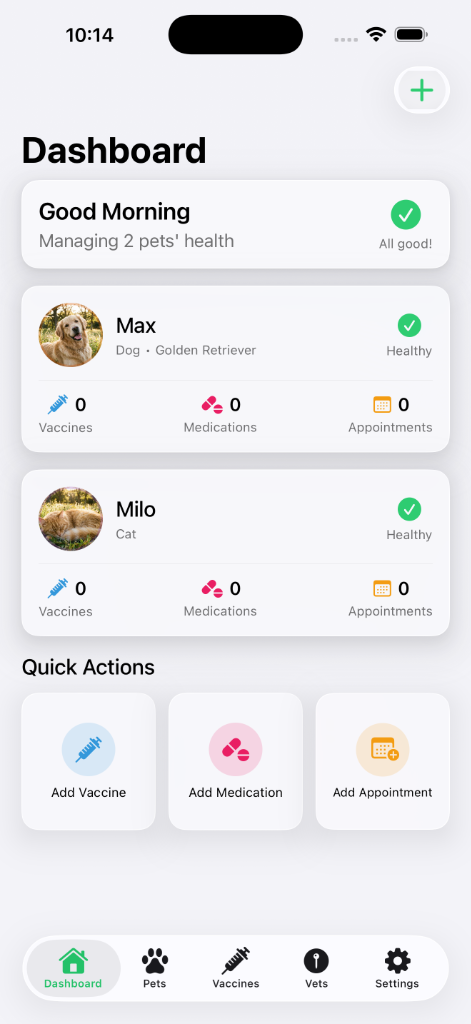
Manage vaccines, medications, and appointments seamlessly with Pawffy. Everything your furry friend needs in one place.
Designed thoughtfully for pet parents who want the best care for their companions.
Keep a clear record of past vaccinations and the due dates you enter for upcoming care.
Set schedules for daily pills, drops, or monthly treatments. Get notified when it's time.
Schedule checkups and keep vet notes organized. Easily find nearby vets with the Vet Finder tool.
Find answers to common questions or reach out to our team.
Open Pawffy and go to Settings → Pawffy Plus. The App Store shows the available plans, current price, and any introductory offer for which your Apple ID is eligible.
Go to your iPhone/iPad Settings → Apple ID → Subscriptions → Pawffy Plus → Cancel. Your access continues until the end of the current billing period.
Open Pawffy → Settings → Restore Purchases. Make sure you're signed in with the same Apple ID used for the original purchase.
Pet records are stored on your device. Pawffy Plus members can explicitly enable private iCloud sync. Read the Privacy Policy for the services Pawffy uses and the choices available to you.
No. Pawffy is local-first and works without an account. Existing Sign in with Apple users can manage that compatibility connection from Settings; iCloud sync uses your explicit consent and current Pawffy Plus entitlement.
Absolutely! Pawffy is optimized for both iPhone and iPad with an adaptive layout that takes advantage of the larger screen.
If you have any questions, feedback, or need assistance with the Pawffy app, our support team is here for you.
Contact Support